
Steph Skardal had a neat idea on using Wufoo for design feedback that she [blogged about recently](http://stephskardal.com/using-wufoo-for-design-feedback/). The idea is to show different variations of a design directly in the form, then use a radio button field to have people vote on their favorites.
The way Steph did it was to have all the design choices as images at the top of the form. They each have a corresponding label. Then below, the radio buttons reference those labels. That’s perfectly acceptable and may be ideal depending on the size of your images. Here I’ll show you another technique. You can literally make the labels for each radio button choice an image. You use HTML for these images, like:

You’ll have to host (or find hosting) for these images yourself. You could use something like [Photobucket](http://photobucket.com/), [Flickr](http://flickr.com/), or even [Dropbox](https://www.dropbox.com/) (put images in public folder) to do that. Then add those images to each choice like so:
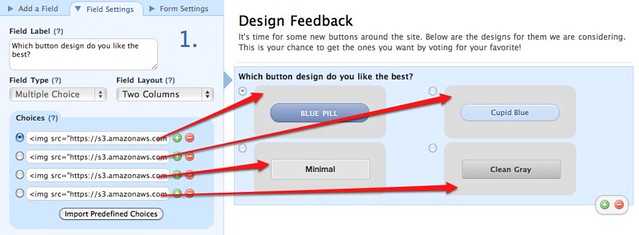
Notice I’ve also set the radio button’s Field Layout to **Two Columns**, because the images I’ve chosen fit nicely into a 2×2 grid. Here are the maximum widths for images based on the number of columns you use, assuming the form is at its default width (as when it’s hosted on wufoo.com without custom CSS alteration).
| One Column | 528px |
| Two Columns | 253px |
| Three Columns | 158px |
After adding a quick paragraph field for comments, the final form looks like this:
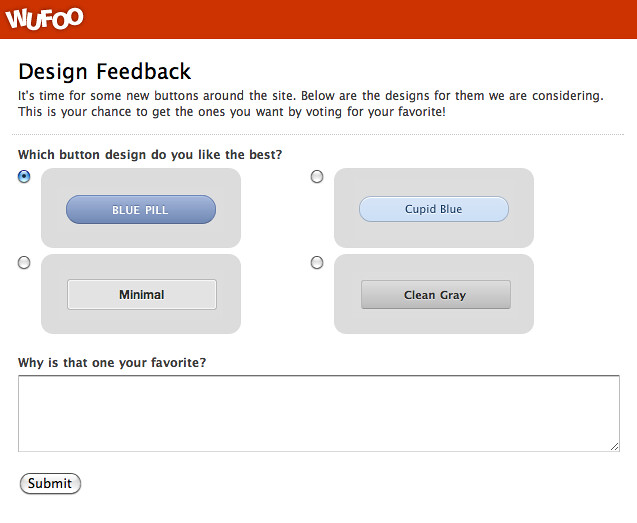
If you’d like a head start on building a form like this, check out the form in our [Form Gallery](http://www.wufoo.com/gallery/templates/) where you can view this very example and add it directly to your Wufoo account.
View Example Form / Add Form to Your Account
##Usable Results
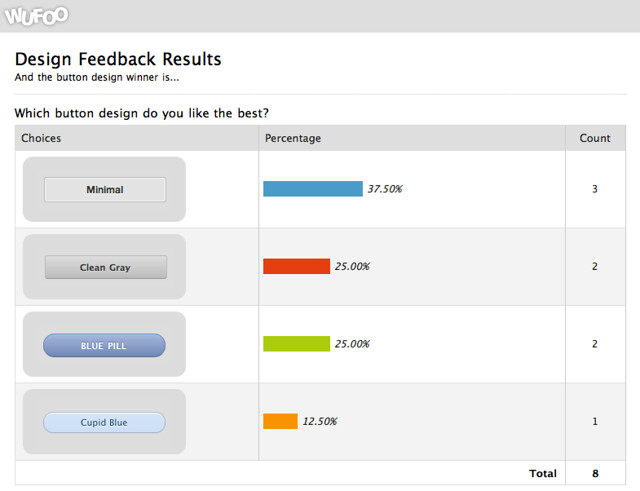
To see the results of which design was liked the most, you can [build a report](https://help.wufoo.com/articles/en_US/kb/Report-Builder/). Your best bet is to use a **Chart** widget, as the labels will be the images themselves and the results couldn’t be more clear:
##Variations on a Theme
Being able to vote on image choices certainly isn’t limited to design feedback. You could put images in the label choices for other types of forms, like:
– Ask kids what their favorite cartoon characters are
– Poll your friends and family on what kind of car you should get
– Create a logic quiz (i.e. which of these images is not like the other…)
By the way, like those buttons? They are [available here](http://ubuwaits.github.com/css3-buttons/) via Chad Mazzola.
Comments
Everyone needs a hug.
Posted March 3rd, 2011 by webmaster@bethamtampa.org.Hey! Thanks for mentioning my article & letting me know how to do things the right way 🙂 I didn’t realize you could use wufoo this way when I filled out the form & my implementation left a few of my friends confused since the radio buttons were below the page fold. I guess the explanation here works well for smaller images and it’d be great to link to the larger versions of the images in the label.
Posted March 3rd, 2011 by Steph Skardal.Great blog post! After some helpful pointers from wufoo’s Chris C., I created a similar implementation for a landing page I’ve been experimenting with: http://promo.mekova.com/my-social-hub
Posted March 3rd, 2011 by Mekova.This will be ideal for implementing pictures of items to choose from – absolutely fantastic! I’ve implemented wufoo for a clothing ordering system for the firefighters on our department. Now I can integrate in pictures of each item right into the ordering form w/o having to implement any CSS!!
Thank you!
Posted March 3rd, 2011 by Ben Tupper.What’s funny about this is that I’ve been doing this for a while with wufoo. As soon as I found out you could put and image into most any field this is instantly what I thought of. Thanks for letting people know how useful this can be. Check out a recent sketchVote form that I put together: http://mdavisdesign.wufoo.com/forms/emmerson-sketch/
Posted March 3rd, 2011 by Mike Davis.You guys are tooo cool 🙂
Posted March 3rd, 2011 by Alan.This may belong in the forums so my apologies, but can anyone comment on where you choose to host your images? Does it matter if it’s on a secure server (http vs https)? I’m thinking in terms of ensuring that images in forms (and templates for that matter) show up across all browsers.
Posted March 3rd, 2011 by Jason Bray.I’ve been hacking together gravity forms to do this, but have been looking for reasons to use wufoo more and this is definitely one of them. Thanks for the info guys.
Posted March 3rd, 2011 by Joshua Chase.