
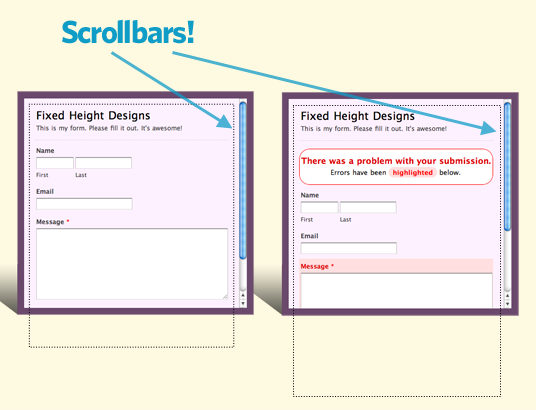
Does your website’s layout have an area you would like to use a Wufoo form, but that area has a **fixed height**, i.e., a size that cannot grow taller or shorter depending on the content inside? If you are in this position, you can still use a Wufoo form! Wufoo forms adjust themselves in height by default, but you can override this, set a fixed height, and allow your form to have a **scrollbar** very easily.
###JavaScript embed code adjustments
The trick here is changing the value of the `autoResize` parameter to false and changing the `height` parameter to your desired height:
<script type="text/javascript">var host = (("https:" == document.location.protocol) ? "https://secure." : "http://");document.write(unescape("%3Cscript src='"   host   "wufoo.com/scripts/embed/form.js' type='text/javascript'%3E%3C/script%3E"));</script>

<script type="text/javascript">
  var x7p4s5 = new WufooForm();
  x7p4s5.initialize({
    'userName':'examples',
    'formHash':'x7p4s5',

    /* Changed to FALSE for scrollbars */
    'autoResize':false,

    /* Setting a fixed HEIGHT */
    'height':'514',

    'ssl':true});
  x7p4s5.display();
</script>
Now the automatic height resizing of the form will stop, it will be of a fixed height, and if the form is (or ever becomes) taller than the fixed height, there will be scrollbars allowing the entire form to be seen.
Comments
Thanks, as always making life easier 🙂
Posted August 19th, 2010 by Adriana.Everyone needs a hug.Thanks guys! This is fantastic! I’ve had this problem and now you’ve come to the rescue.
Posted August 19th, 2010 by Rob.Love it! Except it doesn’t apply to the payment page 🙁
Posted August 19th, 2010 by Anthony.Hi Athony, that’s strange. It might be a bug on our end. We’re looking into it now.
Posted August 19th, 2010 by Kevin Hale.Doesn´t work to me smooth since a while. I have an external CSS and the embedcontainers are often to short. It seems to me that the calculation of hight fires before loading the external CSS. In some cases the Container recalculates when filling out so the height-attribute is set from 700 to 760px (for example) Any solution? Fixed hight is no good to me as we often use fieldrules, so the form gets longer while filling out. That and some other things about datahandling and connectivity makes me think of leaving wufoo hafter some years of happy using
Posted August 19th, 2010 by Henrik.