
Sweet succulent social media! It’s been a long time coming, but our team has finally put the finishing touches on our very own Wufoo Facebook App. Now, you can easily [add a form to your Facebook page](http://help.wufoo.com/articles/en_US/SurveyMonkeyArticleType/Share) and easily collect information and leads from your fans. Here’s how it’ll look on Facebook:
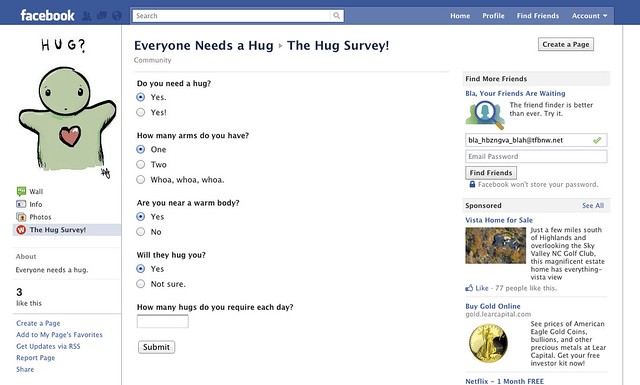
To install the Wufoo Facebook App and get your Wufoo Form embedded on your Facebook Page, simple click the “Code” button beneath any form from the Form Manger, click the “On Facebook” tab, and click the “Add To Your Page” button. This will bring up a popup window to select which page you’d like to add it to. Select which page and add it, then head back to that page and click the newly-added “Wufoo Form!” tab to select which form you’d like to embed.
##Screencast
Here’s a screencast showing how it all goes down:
##Requirements
To integrate Wufoo on to your Facebook page, you’ll need the following:
– You’ll need a [Facebook account](http://facebook.com).
– You’ll need a [Wufoo account](http://www.wufoo.com/).
– You’ll need to create (or already have) a [Facebook Page](https://www.facebook.com/pages/create.php).
– You’ll need to install the Wufoo App (see above)
Please note that you can only have **one** Wufoo App installed per Facebook Page, which means you can only associate **one** form with your Facebook Page.
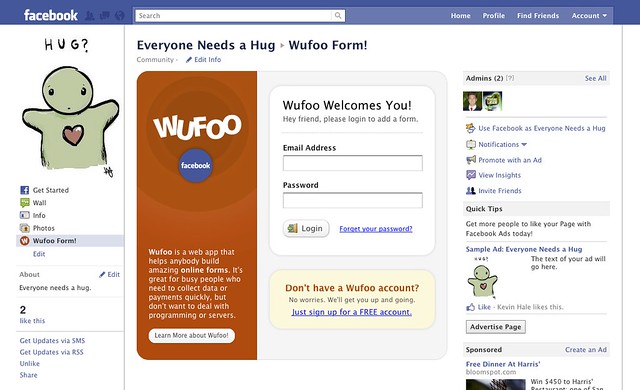
After you install the Wufoo App to your Facebook page, you’ll see a prompt to login to your Wufoo account to access the forms you’ve created on Wufoo. If you’re already logged into Wufoo, you’ll just go straight to a list of your forms. One of the really cool things about this integration is that from Facebook, you’ll be able to access a mini Form Manager that’ll make you feel right at home to those familiar with our interface.
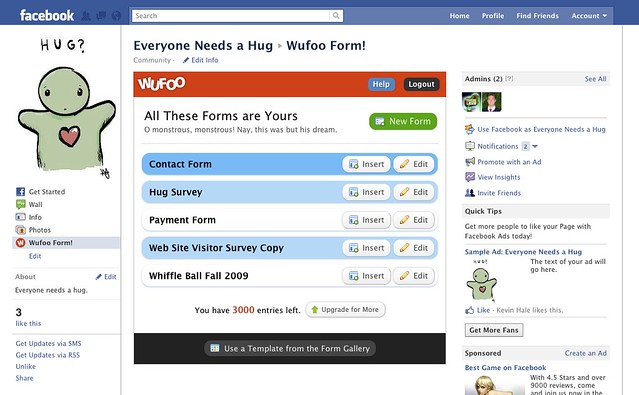
One thing some of you will notice is that the embedded forms on Facebook do not show the Form Title or Form Description from your Wufoo form. This is because Facebook already provides a place for a header for the tab. To change that tab’s name, just follow these [instructions for renaming the Wufoo App’s tab title](https://help.wufoo.com/articles/en_US/kb/How-to-Add-a-Form-to-Facebook/#faq3). If you need provide a description or instruction to your users at the top of the form, just use a [Section Break](https://help.wufoo.com/articles/en_US/kb/Form-Builder/field-types/#section) at the top of the form in the [Form Builder](https://help.wufoo.com/articles/en_US/kb/Form-Builder/).
Thanks a lot for everyone’s patience and testing while we worked out all the kinks. We’re really happy with how everything turned out and hope you all will enjoy collecting data from your favorite social circles!
Comments
Sweet stuff. I haven’t had the chance to come across an APP with forms though. Going to check yours out 🙂
Posted November 15th, 2011 by Marco Berrocal.This is really cool. I am just wondering if I have a current survey in process for my company fans, if I should midstream add it to our page: http://facebook.com/chatnchill ? I am kind of new to all of this tracking stuff, but I was tracking it with bit.ly. But if this is a survey that is strictly for our fans only, then there is no need to track, right? Sorry if I am not making sense, as I am just trying to keep up with everything in marketing and social media plus our beach bar and beach destination wedding business too:-) lol
Posted November 15th, 2011 by Kwanza Clay Bowe.Oh, and I forgot to say, a big THANK YOU for this very cool app, too!!!
Posted November 15th, 2011 by Kwanza Clay Bowe.Great App.
Posted November 15th, 2011 by EL.Question: what was that icon you clicked on to automatically log back into your FB account? (3:05)
thanks
Great stuff everyone!
Anyway we can get the form styling on these pages soon?
Posted November 15th, 2011 by Ben.Great app but it seems to randomly change the link to the form on the left in Facebook from the title you set back to ‘wufoo Form!’ when you change subpages within my Page.
Eg my form is called ‘Send us your wishlist’. It says this before logging in. Changes to ‘wufoo Form!’ after logging in, changes back to my name when I go to my Welcome page, then back to ‘wufoo Form!’ when I go to the actual form page.
Posted November 15th, 2011 by justin fleming.So this can be used for people to make direct donations to our org?
Posted November 15th, 2011 by Jodi V..To follow up with the last question, can this lead to paypal?
Posted November 15th, 2011 by Lisa.You can use our Payment Integration features to collect donations with PayPal via a wufoo form. You can learn more about those features here: http://wufoo.com/payments/
Posted November 15th, 2011 by Kevin Hale.@justin : The tab name changes seem to be a bug on Facebook’s end that was just introduced today. Hopefully, that gets fixed soon.
Posted November 15th, 2011 by Kevin Hale.@EL – https://agilebits.com/onepassword
Posted November 15th, 2011 by Chris Coyier.Hi I hope you guys can answer this asap:
Is there any way to insert a form in a profile page too instead of a Facebook page? If not, will you be coming out with the said feature soon?
Really hope you could help me, thanks SO MUCH.
Posted November 15th, 2011 by pucci.@pucci – Unfortunately this just isn’t possible right now. As in, it’s not possible with what Facebook provides.
Posted November 15th, 2011 by Chris Coyier.Hmmmm allowed the app to have access, but when I go back to the page, app isn’t there.
Posted November 15th, 2011 by Elena.This is really Great. We have done this in our facebook page. http://www.facebook.com/irisholidays . Also wondering whether we can embed this as a part of an already existing facebook tab
Posted November 15th, 2011 by Iris Holidays.Thank you for your info re http://wufoo.com/payments/. Can that text be changed from thankyou for your payment to thank youf or your donation? And does Paypal take their normal cut, or do you have a special deal somehow that we get 100% of the donation? if so I will put all our donations through this way as Paypal takes $3 something out of every $100 and your checkout cart is easier too. Can it be set to do this in NZD rather than USD? Can you please email me a reply in case I miss a reply via this forum, thanks wufoo, you keep on pulling it out of the hat!
Posted November 15th, 2011 by Kim.With ALL the BASIC Payment – PayPal Integration change requests we have been waiting for, for almost 2 YEARS, don’t you think FaceBook forms are overdoing it?
FormStack has no problem sending a confirmation email AFTER a successful payment has been made. You’ve been dragging your feet for 2 years.
FormStack has no problem differentiating between a PayPal PRODUCT purchase and a SERVICE Purchase. wufoo can’t or won’t do it.
But we get FaceBook Forms!
Happy Thanksgiving..
What are you guys smoking now that you’re in CA?
Posted November 15th, 2011 by John Fothergill.Good application.
Posted November 15th, 2011 by WordPress Guru.Everyone needs a hug.
Posted November 15th, 2011 by WordPress Guru.I was wondering if the facebook bugs have been worked out yet? (in particular the name on the tab switching). I’d love to integrate one of our wufoo forms onto our facebook page, but I’d like to be sure the tab isn’t going to switch names. Thanks!
Posted November 15th, 2011 by Laurel.@Laurel – I believe so, yes. Facebook has marked the bug as “fixed”.
Posted November 15th, 2011 by Chris Coyier.Love it! Thanks for this app, one issue though…I’ve added the app it to our page but keep getting the error “no socket template” upon clicking he app tab. I tried using a different browser and was able to get to the login phase but then received the same error.
Posted November 15th, 2011 by Jaclyn Goris.Hello also seems to me buenisimo this application. But the same thing happens to me a companion. I can not see in my browser, it will be?
Posted November 15th, 2011 by Manuela Perez - Vudu.Thank you for the information, but what is the difference between Google Blog and this blog?
Posted November 15th, 2011 by web design.Would it be possible to password information from Facebook to the form? I mean since you are getting the permission to collect the name for example. Can you send this info to the form so that it can be seeing?
Posted November 15th, 2011 by Dimitris Rakopoulos.Is there a way to post more than one wufoo form on the fb app? I want an email signup form and at least one other form (on a different tab) to collect testimonials.
Posted November 15th, 2011 by Chris.thanks much
I have the app in my Facebook page. When I click on it, I get the wufoo login page, I enter the info, and then I just get a red screen…. it won’t load. I’ve tried it multiple times over the past few weeks. Any ideas? Thanks!
Posted November 15th, 2011 by Kelly.I added the app & allowed permissions, but then the app doesn’t show up on any of the pages where I’m an admin. Is this a bug?
Posted November 15th, 2011 by Nicole.Hey, Gang,
Does this Facebook-ness also show up on Timelines and stuff? In other words, if someone fills out a form, does it announce to the FB world that “John Doe has filled out a wufoo form.” to John’s friends? Strangely enough, I have a client that actually wants that. Is it possible?
You guys are super.
Posted November 15th, 2011 by Matt Bivins.Thank you,
very informative post and cool app!
Posted November 15th, 2011 by Κατασκευή ιστοσελίδων.We used wufoo form for a social media campaign on FB over the holidays. Are there any changes or differences we need to know given the forced change to Timeline on March 30th? Or, does the same approach to embedding forms still work?
Posted November 15th, 2011 by Jim.Everyone Luv Robbi Clarke
Posted November 15th, 2011 by Robbi Clarke.Thank you for your guide.
Posted November 15th, 2011 by fireworks Greece.I didn’t know about wufoo
I was excited to see FB integration but then quickly disappointed.
The first time I try to login it refreshes and I enter my credentials again. The second time I keep getting the error “no socket template” when trying to login. After I click OK I get a red screen with a rotating wheel.
I have tried this with and without SSL and 3 different browsers with no success. Any fix for this?
Posted November 15th, 2011 by Stephen.I am having the same problem with “no socket template” I need a fix quick
Posted November 15th, 2011 by Frank.It will not laod on my facebook page after installation. After I click on the “wufoo” button on my page
Posted November 15th, 2011 by valentin.which leads me
to the page where I log in. Then it is just an orange square with a loading wheel. It is a local buisness page and I do have administrative privilages for it.
I can’t change the form on facebook, I’ve pulled wufoo off readded it still won’t change…so frustrated.
Posted November 15th, 2011 by JBAILEY.Is there anyway that we can add more than one form on facebook page?
Thanks
Posted November 15th, 2011 by blee.Question: So if I have 15 forms for various clients, can I associate ONE form per ONE Fb page for multiple clients? And, would the client be able to see the list of all 15 forms once they are logged in, OR once I pick and insert a form, is that information not visible? thanks! Stefanie
Posted November 15th, 2011 by Stefanie.Cant wait to try it!
Posted November 15th, 2011 by Steve Almond.Everyone needs a hug.
Posted November 15th, 2011 by Steve Almond.Getting error message when open wufoo form as
Sorry! An error has been encountered that wufoo does not know how to handle. The error is:
Invalid Signature
Posted November 15th, 2011 by satish.I’m getting the exact same error message as satish. Please help!
Posted November 15th, 2011 by sesimag.can we add more than one Form?
Posted November 15th, 2011 by JFernandez.Hello, I am not getting the popup when I click add to page. I am using google chrome but have tried w safari also. help?
Posted November 15th, 2011 by david.Hi David, make sure you’re completely logged out of the Facebook account before clicking Add to Page in the wufoo Code Manager. If the issue continues for you, head to wufoo.com/support and we’ll help you out.
Thank you!
Posted November 15th, 2011 by Kayte Korwitts.