The Wufoo Blog

You Can Now Embed Wufoo Forms on WordPress.com!

By Kevin Hale · September 13th, 2011

Hey, hey, hey! We’ve got a new embed snippet available in the Code Manager to help our friends on the WordPress platform more easily embed your Wufoo forms safely and securely on your favorite blogging platform. The new WordPress Shortcode snippet can be used in two ways: You can either use it in conjunction with our new WordPress Shortcode Plugin or right away on blogs hosted at WordPress.com.
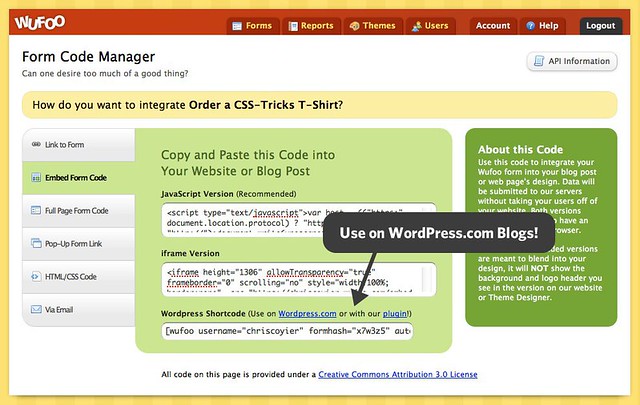
WordPress Shortcode

Embedding on WordPress.com!

There are over 58 million blogs powered by the WordPress platform and nearly half of them are hosted over at WordPress.com. Because the hosted service doesn’t allow JavaScript or iframes to be used on these blogs, it unfortunately wasn’t possible to embed a Wufoo form directly on these blogs before today.

Thankfully, the WordPress guys have a wonderful API to allow services to create shortcode versions of their snippets that can be used safely. What’s a shortcode?

A shortcode is a WordPress-specific code that lets you do nifty things with very little effort. Shortcodes can embed files or create objects that would normally require lots of complicated, ugly code in just one line. Shortcode = shortcut.

For example, here’s an example of a Wufoo shortcode snippet:

[wufoo username="master" formhash="m7w7z1" autoresize="true" height="505" header="show" ssl="true"]

As you can see it’s a lot easier to understand than our other snippets and very simple to adjust to your needs. If you wanted to say, hide the form title and description, you can just set that header="show" parameter to header="hide" and BAM! you’re ready to rock like a 18th century French aristocrat. Many thanks goes out to Evan Solomon over on the Automattic Team for helping us get this integration up and going so quickly. You are a wizard and a gentleman.

Wufoo Shortcode Plugin

Now, if you host a WordPress setup on your own server, you probably know that you can already copy and paste our JavaScript and iframe snippets to embed a Wufoo form on your WordPress posts and pages. The trick, however, is that you need to make sure to be in the HTML tab of the writing area. If a user is in the Visual (default) tab, the embed code will not work. Shortcodes, however, will work either way and, as we’ve shown you, they’re clean!
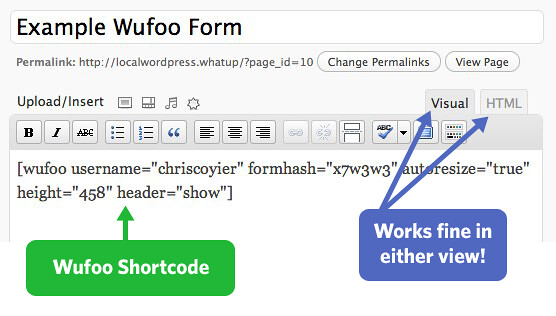
Wufoo Shortcode Example

If you want to use these shortcodes on your own WordPress installations, just install our WordPress Shortcode Plugin on your blog and then you’ll also be ready to rock. For old school manual installation people: copy the folder “wufoo_shortcode” into the /wp-content/plugins/ folder. Then go to the Plugins area of the Admin and activate. Otherwise, search for Wufoo Shortcode Plugin from the admin area of your WordPress site in Plugins > Add New.

This entry was posted 8 months ago and was filed under News & Updates. Comments are currently closed.

Comments

  1. Anyone know if this will make the forms quicker to appear on wordpress?

    Posted 8 months ago by Steve.
  2. HURRAY! Thank you so much for working on this!

    Posted 8 months ago by NG.
  3. If you’re making a super-narrow form in a sidebar, you might want to check out our tips on narrow forms: http://wufoo.com/2011/02/01/narrow-forms/

    Posted 8 months ago by Andrew Gosnell.
  4. Awesome! But…

    Wish I could only hide the title :) Now, I have to have untitled pages in my WordPress. I want the header, but not the title!

    Posted 8 months ago by Emma.
  5. Hey Emma, if you want the form description but not the title, you might consider hiding the header using the instructions above, then adding a Section Break at the top of your form for a text description area:

    http://wufoo.com/docs/form-builder/field-types/#section

    Posted 8 months ago by Andrew Gosnell.
  6. Everyone needs a hug. Thanks for the work

    Posted 8 months ago by Wineguys Radio.
  7. Everyone needs a hug. Thank you for providing this pluggin!

    Posted 8 months ago by Jude.
  8. Nice work! I look forward to trying it. Question: Will the embedding work with Buddypress; that is, how could I embed a form within the Groups tab to capture additional information about the “group” and then how would I extract that data to place it on the “group’s” blog for example?

    Last question: at the moment, group “type” cannot be established in Buddypress; however, with your form, the admin of a new “group” during the creation/customization process could use a Wufoo form to appropriately define itself according to the options/fields provided on the form. That’s actually a question. Is this, … would this be possible? :-)

    P.S. Group “type” examples would be a Buddypress community consisting of Fantasy Football groups, Ballet studios, and World of War Craft groups; thus, each group type would require a different set of fields to define itself.

    Thank you for the continuing improvements!!!

    Posted 8 months ago by Quint.
  9. Everyone needs a hug. Thanks for the shortcode for WordPress.com users. I’ve installed a wufoo to mailchimp subscription form on my site (SmugMugHugs, no less) using a CSS style sheet (hosted elsewhere of course) to finally get rid of the ugly WordPress.com submit button! Yeah! Thank yOu!

    After hiding the header, I re-sized the height as well since it appears to be based on the total height including the header in the original code. The height also changed when I added a “hidden field” which seems odd. Is there anything I should be concerned about by changing the height ? Also, SSL is included in free accounts? (It’s in the code of my Gratis account)

    @Emma, I was able to hid everything but the field and submit button. The header=”hide” works great.

    Posted 8 months ago by Holly.
  10. I’m having trouble getting the shortcode to work anywhere but in a page and/or post. This post mentions that it should work in a text widget but that hasn’t worked for me so far. Any suggestions as to what I might be doing wrong?

    Posted 8 months ago by Zack.
  11. Do you have a similar service for embedding reports into webpages?

    Posted 7 months ago by Cason.
  12. Everyone needs a hug.

    When moving to a second page on a form embedded on a WordPress page, the second page defaults to the bottom of the page, not to the top. That’s because, as far as WordPress knows, you have not left the original page. This is seriously confusing for the person filling out the form.

    Can this be fixed?

    Thanks.

    Posted 7 months ago by David.
  13. I love it. This is going to help my blog out so much. I’ve found that many of the form plugins on wordpress.com don’t compare to Wufoo. Thanks for the plugin.

    Daphne Gledhill Free Email Marketing

    Posted 6 months ago by Daphne Gledhill.
  • Search

  • About

    The Wufoo Blog is the official online publication written by the developers of Wufoo about their online form builder, form-related technologies, and whatever else may fit their fancy—like robots.

  • Archives

Need Your Help