The Wufoo Blog

How to Send Email Notifications To Different People
Based on the Dropdown Field

By Chris Coyier · December 2nd, 2010

Using Wufoo’s Form Rules (available on any paid plan) you can easily set up your form to send email notification to particular people based on a user’s selection while filling out the form. Let’s do it!
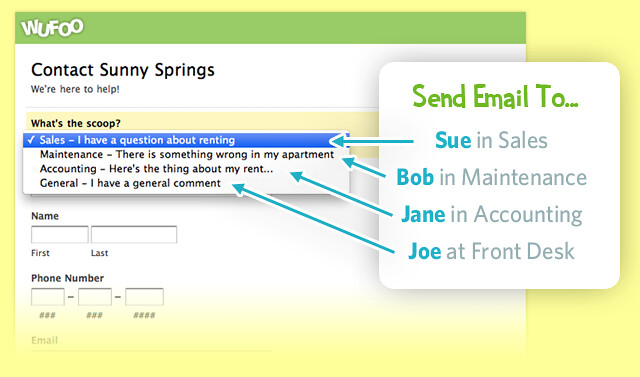
Send Email To...

Dropdown Choices

Step 1) Create Choice Field

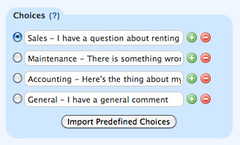
A dropdown menu or radio button field generally makes the most sense for this task. Add one of these to your form, and add the choices for the user to pick from. These should essentially be reasons why the user is filling out the form, which then map to individual people. Unless it’s an internal organization form where everyone knows each other, it’s best not make people direct choose which person it’s going to.

Step 2) Create Form Rules

Instead of creating regular email notifications for this form, which send to an email address regardless of any choices made, we’ll use Form Rules. Click the Rules button beneath the form you are working on from the Form Manager. Click the Form Rules tab, and then the Create a Form Rule button. Each choice you created in Step 1 will now have its own rule. Use the sentence-structure format to build the rule, matching the field and the choice. Then choose the Send Email option below that and enter the email address of the person who is supposed to get the email notification when that choice is selected.
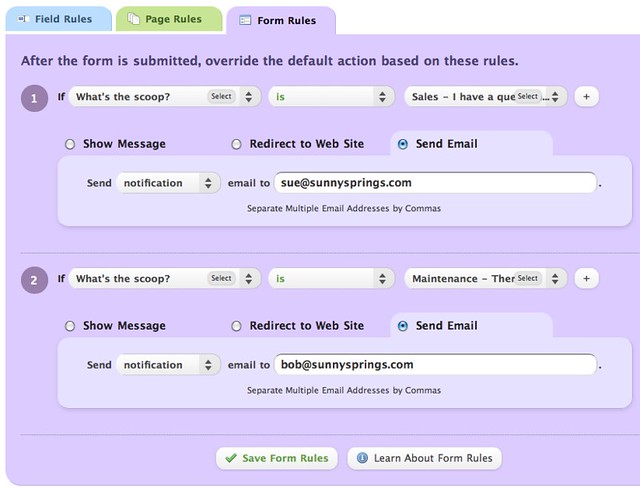
Rules for Email Notifications

Step 3) Try out your awesome new form

Go check out your form and try filling it out and submitting it. Choose “Sales” from the dropdown, then prairie dog out of the cubicle and yell, “HEY SUE, CHECK YOUR EMAIL, THE CONTACT FORM SENDS YOU SALES QUESTIONS DIRECTLY NOW.” She’ll love that.

This entry was posted 1 year ago and was filed under News & Updates. Comments are currently closed.

Comments

  1. Is it still limited to 50 rules?

    Posted 1 year ago by Duane Birchem.
  2. Yes, form rules are limited to 50 rules on the paid plans.

    Posted 1 year ago by Kevin Hale.
  3. This is cool and all, but I’m mostly excited about annoying Sue.

    Posted 1 year ago by Venita.
  4. If you want a good message to send to Sue through the form, use: “Guess what has four choices and rules? This contact form!” :)

    Posted 1 year ago by Andrew Gosnell.
  5. This is very cool. It would also be very handy if the email notification could go to the email address that the person filling out the form entered in the email field.

    Posted 1 year ago by Jamie.
  6. When are you going to increase the number of rules beyond 50??????

    Posted 1 year ago by John Fothergill, Jr..
  7. @Jamie You can do that under Form Settings right when you are building the form. Click the “Send Confirmation Email to User” checkbox.

    Posted 1 year ago by Chris Coyier.
  8. @Chris under “Send Confirmation Email to User” check box in form settings is handy but there are no rules attached to this. The confirmation email will be sent every time a user fills out the form but does not adhere to certain rules like the notifications you can get through the form rules.

    Posted 1 year ago by Jamie.
  9. I would like to know when you will allow a rule to be sent to multiple email addresses based on their checkbox selections. Say if someone checked off various checkboxes for departments, that a rule would cause every checked box to send an email copy to it’s own email address based on which box was checked.

    When will this be available, because I was told it can’t do that.

    Posted 1 year ago by Tony R.
  10. Hi Tony, we don’t have a date since we don’t have any plans for that kind of functionality at this time.

    Posted 1 year ago by Kevin Hale.
  11. Is there a limit to how many multiple email addresses we can send the notification to?

    Posted 1 year ago by Jeremy.
  12. Can notification go out in the way described above on an entry that has already been submitted? If I go into the admin of the entries and change the drop down then save the changes… will it notify the person based on the new selection in the drop down? I’ve been playing with this and I haven’t had any luck

    Posted 1 year ago by Ben Tupper.
  13. We don’t have a way to send out the notifications after editing an entry in the entry manager, sorry.

    Posted 1 year ago by Andrew Gosnell.
  14. Is there a way to send results to different Campaign Monitor lists? We have a form where someone can register for events in different cities. Right now we only have two cities, but we want to populate two different CM lists to be able to send out reminders and updates to the two different cities.

    Please let me know. Thanks!

    Posted 1 year ago by Dennis.
  15. I created 7 form rules to generate notification emails to 8 different people within my office (one of the rules sends notification to 2 people). When tested, only 3 of 8 received the notification email. All of them looked in their spam and junk folders as well but did not find the email. What could be causing this and how can it be fixed?

    Thanks, [hug]

    Posted 1 year ago by Bryan.
  • Search

  • About

    The Wufoo Blog is the official online publication written by the developers of Wufoo about their online form builder, form-related technologies, and whatever else may fit their fancy—like robots.

  • Archives

Need Your Help