Use this guide to learn how to add a pay by check option to your Wufoo payment forms.
While Wufoo has made it super simple to collect credit card payments through our Payment Integration features, there hasn’t always been an easy way to handle those people who want to pay by check. But with the addition of logic and branching, instructing your form to handle different payment methods can be done with only a few steps.
Step 1: Add multiple choice option to your form
Add a multiple choice form to your field with the option to pay by credit card or checks. It may be that you prefer one or the other payment method, so feel free to encourage your payment method of choice by making that option the default value.
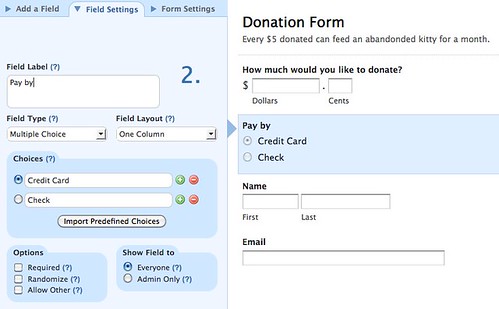
The form might look something like this:

Step 2: Set up regular credit card payment
Set up the payment integration for the form, which will apply to the people choosing to pay by credit card.

Step 3: Set up a page rule
The heart of this technique is in our Page Rule logic. Set up a new Page Rule which, when the multiple-choice payment option is Check, will skip right to the confirmation page after submission. This rule will basically instruct the form to bypass the credit card payment page when a user is paying by check.

Step 4: Information specific to by-check payers
After a user has chosen to pay by check and submitted the form, they will need to see a special message tailored to them which tells them how to proceed. To do this, you can use a Form Rule to display a custom message.
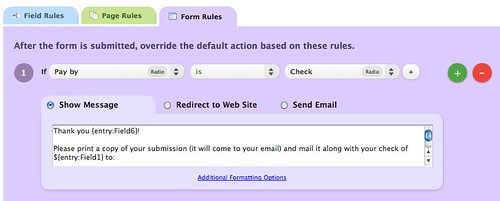
The rule in this example checks if the multiple choice Pay by field was Check and displays a custom message thanking the person and explaining where they can send the check to.

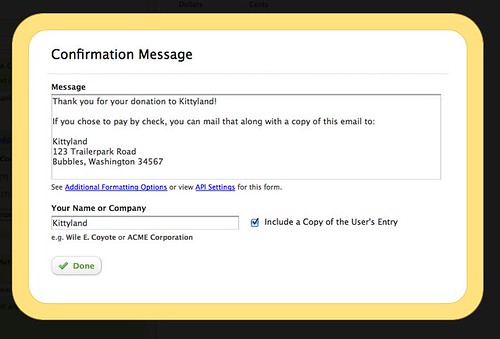
Back in the Form Builder, you can set your form to send a confirmation email which will again remind users what to do:
Wrap up
That wraps up how you can turn a payment-enabled form from credit card only payments to include a pay by check option. Remember that if you were selling something, you should mark orders that come in as pay by check and hold off on shipping until the check has arrived and cleared. If you have any questions, let us know!