Create Sweet Multi-Page Forms with Wufoo
By Kevin Hale · November 17th, 2009Last night we enabled a new button in the Form Builder that allows you to add Page Breaks to your Wufoo forms. This single button ushers in a load of new pagination features that allow you to create really stunning multi-page forms and we are thrilled to present them to you today.
To quickly illustrate the power of Page Breaks, let’s say you’ve created a 10 question customer satisfaction survey in Wufoo and you noticed that it’s kind of long and would ideally be broken into the following three sections:
With Page Breaks, you can very quickly (and we’re talking seconds here) drag them to the appropriate places in the form builder and create a three part form complete with previous/next buttons and a progress bar that’ll work exactly like this:
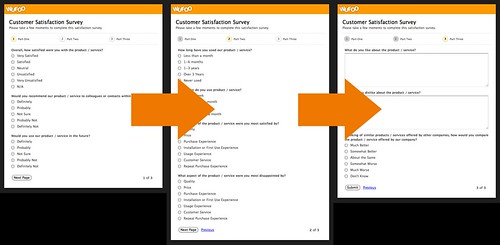
Pagination was one of the most requested features for Wufoo and we’re really proud of our approach to the problem. We’ve spent months architecting and testing the workflow of this implementation just to make sure that it feels effortless on your end and we think you’re going to love all the goodies that come with creating multi-page forms on our service. For those that want to see the experience for yourself, Ryan and Tim created this introductory screencast to show off all the sweet features.
Here’s a more detailed breakdown of the new pagination features:
Drag & Drop Interface
One of the really nice things about setting up multiple page forms in Wufoo is that you do not have to go through the process of assigning fields to specific pages. All you have to do is just drag a page break between some fields and Wufoo automatically assigns fields before it to one page and the fields after it to the next page. Basically, it just works and works the way you’d expect it to.
One of the nice results from this approach is that it also makes it extremely easy for you to reorder fields within and across pages on your Wufoo forms. This means you can experiment very quickly with the different orders of yours questions and better determine the best flow for collecting your data.
Custom Progress Bar
By default on forms with more than one page, Wufoo tries to present to the user some context at the top and bottom of every page to help the user understand how much of the form has been completed and what is left to be filled out. You can choose to show this progress as a series of steps, a percentage bar or not have it show at all. In addition to showing the page number or percentage of the form that’s been completed, you can specify individual names for each page on your form.
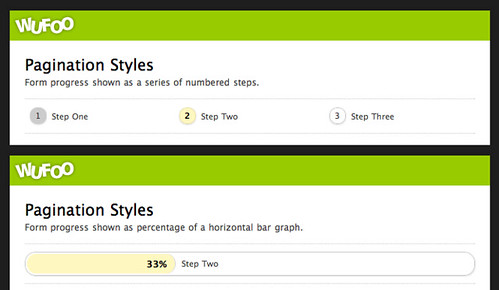
This is great for forms that want to create clear sign posts for each step in the form completion process. We’ve also added the ability to easily show or hide the current page number in the footer of every page.
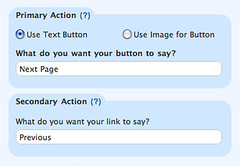
Custom Pagination Buttons
Based on internal testing and the latest research on best practices for presenting buttons used for pagination, we created a versatile system for customizing the primary and secondary actions (next and previous buttons) for each page. You can have each pages’ buttons be unique from the other pages. You can use either a standard button or an image for your primary action. And you can use a built in CSS classname (hideSecondary) to hide all previous buttons on your form.
Many thanks goes out to all of you who helped us test out the feature on our example pagination form. You guys gave us some fantastic feedback and we really appreciated getting help on adding the polish. These new pagination features are available to all users across all plans and we hope you enjoy breaking it down for your users!


YAY! Not to be greedy, but will multi-page forms someday have logic options?
Posted 2 years ago by adam807.You guys rock! Thanks for all your hard work and effort to constantly make Wufoo so awesome.
Posted 2 years ago by Jamie.That’s the plan, Adam. Glad to hear that you’re excited. One step at a time though.
Posted 2 years ago by Ryan Campbell.The Wufoo team does a great job. Keep it up, and I’ll keep talking about you to all my friends :-)
Posted 2 years ago by Ryan.Awesome Job Guys!
Posted 2 years ago by Chris.Yes, of course, I don’t mean to rush you. I just like having things to look forward to. It’s like form nerd Christmas. :)
Posted 2 years ago by adam807.GREAT JOB, guys! Congrats on the feature rollout!
Posted 2 years ago by Mark.This is awesome!!
Posted 2 years ago by Erik Bartz.Everyone needs a hug.
Posted 2 years ago by Erik Bartz.Wow! I was just looking for a solution like this last night. Dreams do come true! Now about that conditional logic option —- that would just flat out ROCK!
Posted 2 years ago by Ryan.Great work!
Posted 2 years ago by Lisa.You guys have Big Brains…and we appreciate those Big Brains!
Posted 2 years ago by Shane.Sweet guys - nice attention to detail.
Do the multi-page forms work with the embed methods - in particular the JavaScript approach?
Posted 2 years ago by Rob Holmes.Slick implementation. I’m really pleased to see that the brower’s back/forward buttons navigate within the paginated form (since if the user navigates away from the page the entry is incomplete and they have to start from scratch again).
It looks like the styling of the progress bar is the theme setting for highlighted fields. Any chance you’ll add options to the theme manager to set the progress bar styling separately? Or is it possible to change the background color of the circles via the Advanced external CSS sheet option?
Posted 2 years ago by Aaron Teskey.Aaron, you can change the progress bar color with the Advanced External CSS option.
Posted 2 years ago by Kevin Hale.Rob, the paginated forms do work with the embed methods and we actually recommend the JavaScript method if you’re breaking up your forms into multiple pages.
Posted 2 years ago by Kevin Hale.Everyone needs a hug.
and by the way, it would be awesome if one day you could integrate Wufoo to interface with Quickbooks just like you guys do with Freshbooks!!!
Posted 2 years ago by Jorge.Wufoo just keeps getting better and better! When they finally add Logic and Branching, this will render ALL OTHER ONLINE SURVEY companies obsolete!
Posted 2 years ago by JKP!.Really nice work guys, I’ll continue to recommend Wufoo to others if you keep developing awesome features
Posted 2 years ago by Tim.Great stuff! Excited to put this into use both professionally and personally as well.
Posted 2 years ago by Andrew.This definitely beats out the competition, particularly FormSpring. This is the greatest idea you could have, except for Conditional Logic. Keep up the great work, Wufoo. Someday, everyone will think this is the best form service around; I know I do!
Posted 2 years ago by Michael.Big hug from Belgium !! We love your work. We use it a lot !! We needed this option.
Posted 2 years ago by Didier.You have helped us so much with your constant improving efforts I don’ think I can run my sites-business without you!
Posted 2 years ago by Román.I love that you guys are continually looking for ways to improve this service. Pagination is terrific. There is nothing more annoying than a long form. I have a question and a suggestion: First the question — when a user finishes a page and moves on to the next one, what happens to the data in that page? Is it submitted or is it held somewhere? Is there a chance that we will get partial responses if users bail on the survey before they are finished?
Second — the suggestion. Add branching to this feature and it will be perfect. I think some of the other respondents are calling it conditional logic. I guess it’s all the same thing — if users clicks A, go here, if they click B, go there. Si
Posted 2 years ago by Sue.Thanks for all of the compliments. We’re glad everyone is as excited as we are.
Sue, the video above shows how partial submissions will work. In short, yes, if someone only fills out one page we do the store the data and report it to you in various ways.
Posted 2 years ago by Ryan Campbell.i luv u
Posted 2 years ago by Josephine.Logic…did someone say logic? Oh, how that would rock! Don’t tell anyone, but I’d pay more for that! Shhh…
Posted 2 years ago by Peter.Everyone needs a hug.
Posted 2 years ago by plp-alleluia.Wufoo keeps improving. Even if you know how to create forms via your own HTML, Wufoo makes it so easy and fun why would anyone want to hassle with it. Great job!
Posted 2 years ago by DRich.Excellent news re Javascript embed - thanks for the reply. I noticed that the “Description” field is displayed on all form pages - might be good to provide the option to display this field only on the first page?
Posted 2 years ago by Rob Holmes.If you’re containing instructions for the form in the description, you might want to put them in the Section Break instead on the first page rather than in the description.
Posted 2 years ago by Kevin Hale.If you guys added logic you’d be the Google of form automation. I’d also pay extra for that. I appreciate the work and the ultimate product your team creates. I love subscribing to a service that continually impresses me with a hint of amazing.
Posted 2 years ago by Michael Shawn McCabe.Nice work, Wufoo team. I really appreciate your dedication to continual improvement as well as your entertaining and clever communications.
Posted 2 years ago by Brett Dickson.Thank you for adding page breaks. One issue though… We are receiving incomplete entries because even when clients don’t complete the form 100% and don’t press the submit button, the entries are still showing up in our database. Any way to still use page breaks but only receive entries when the ‘submit’ button has been pressed at the end of the form? If not, we’ll probably have to stop using page breaks.
Posted 2 years ago by Matt.That is simply great! Thanksssss
Posted 2 years ago by Carlos Rivas.Hey Matt, please note that incomplete entries don’t count against your monthly entry limit. However, if you just don’t like the clutter, you could create a report or a filter in the entry manager to quickly isolate just the completed entries. In terms of making that an option, I’m afraid we don’t have any plans of changing that behavior any time soon.
Posted 2 years ago by Kevin Hale.The implementation of this feature looks so slick! I used to use Wufoo and the only thing keeping me from switching back from Formspring is some conditional logic action. I’m looking forward to trying out Wufoo again in the future, but that’s the one thing that’s absolutely necessary for me. I’ll keep checking back though :)
Posted 2 years ago by Tony Bricko.Everyone needs a hug.
Posted 2 years ago by samuel.Everyone needs a hug.
Posted 2 years ago by rafi.Everyone needs a hug. Sometimes and not everyone
Posted 2 years ago by Savannah Wooden.Yes, I was wondering whether you guys had this yet. Also, kudos for adding the progress bar along with the pagination, that is something one of your competitors, who shall remain nameless, has not included. Logic options are the obvious next step, when can we look forward to something like that?
Posted 2 years ago by Jeff.We’re working hard on logic and branching now, but I’m afraid we don’t have any ETA’s as of yet.
Posted 2 years ago by Chris Campbell.Everyone needs a hug.
Posted 2 years ago by senolecevit.Everyone needs a hug.
Posted 2 years ago by zahi a.Everyone needs a hug.
Posted 2 years ago by Adnan.Everyone needs a hug.
Posted 2 years ago by David.Everyone needs a hug.tydrytreghyre
Posted 2 years ago by retretre.Everyone needs a hug and love.
Posted 2 years ago by Saahiti Nannapaneni.Everyone needs a hug.
Posted 2 years ago by daniboy.Is there any update on the logic improvements?
Posted 1 year ago by Johan Staureby.If a multi-page form isn’t fully completed, can the partially submitted info still be sent to other apps through the notification/webhook system? Or does the partially completed info stay stuck in the DB, but not sent elsewhere?
Thanks for a great product.
Posted 1 year ago by Michael.The entry is only sent to the notification/webhook system when the final submit button is clicked. So partial entries will not be forwarded on.
Posted 1 year ago by Chris Campbell.Very cool product. I want to create a long term customer information form. But I want the customers to be able to fill it out over time ie log back in to complete it if they got stuck on a question.
Posted 1 year ago by david.Can the forms be timed and can it have voice over? Or, is there another form like that you guys have that we could use? I would pay additional for that type of template!
Posted 1 year ago by Jess Horton.Is there a way to have my user review all their selections other then go back to each page? I would like them to do this before they hit the submit button.
Posted 1 year ago by Andrew.Awesome ressource, please keep developing on this..! :)
Posted 1 year ago by webbureau.Neat single button solution! ;)
Posted 1 year ago by Webdesign Thomas.Everyone needs a hug.
Posted 1 year ago by Webdesign Thomas.Groovy, why didn’t I notice this earlier… You absolutely have one of the best form builders out there :)
Posted 1 year ago by Magento webshop.If a user only partially completes a form, is it possible for the user to come back at a later time and finish the form? Or will the user need to complete the entire form again? Thanks for a wonderful product!
Posted 1 year ago by Matt.@Matt - Not at this time. If the user closes the browser window, without finishing the form, they’ll need to start over. Do note however that if they complete at least one page, the data will be available to YOU as a partial entry in the Entry Manager.
Posted 1 year ago by Chris Coyier.I wish I was slimmer, but wishes aren’t plenty so ill try to follow your summits. http://decaorganon.com
Posted 1 year ago by Juliane Seaholtz.